EMS
| Català | Castellano | English |
Certificates: approving
Approve the certificates the secretariat has issued. On approval, EMS generates the PDF and sends it to the applicant.
Required role: the Director position.
When it is your turn
Once the secretariat issues a certificate, the circuit’s last step is yours: you find it as a task in your daily summary and in Academic management → Certificates, under the Pending for me filter.
Approving
- Open the request.
- Check the details in the Applicant, Workplace training and Documentation tabs.
- Open Actions → Approve and confirm.
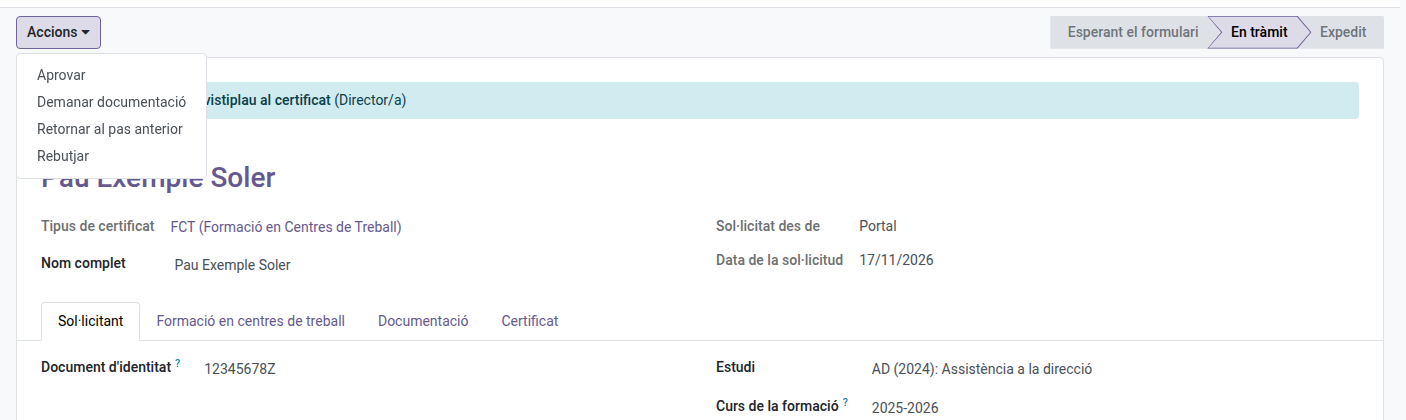
EMS:
- adds the Approved stamp;
- generates the certificate’s PDF, with the secretariat’s and the Director’s stamps and, at the end, the agreement’s pages;
- emails it to the applicant, who can also download it from the portal or from the link.
The PDF is in the request’s Certificate tab.
If something is wrong
- Actions → Return to the previous step — sends the request back to the secretariat with the reason; its stamp is undone.
- Actions → Request documentation — asks the applicant for what is missing.
- Actions → Reject — if the certificate cannot be issued; the applicant gets the reason by email.
You can also see every certificate request of the centre by removing the Pending for me filter.