EMS
| Català | Castellano | English |
Checking a student card
The back of every student card has a QR code. Scanning it shows whether the card is genuine and whether the student may leave the centre right now. You don’t need to sign in to EMS.
Required role: anyone holding the card. No EMS account is needed.
Checking a card
- Scan the QR on the back of the card with your phone’s camera.
- Open the link that appears.
- Compare what the page shows with what is printed on the card.
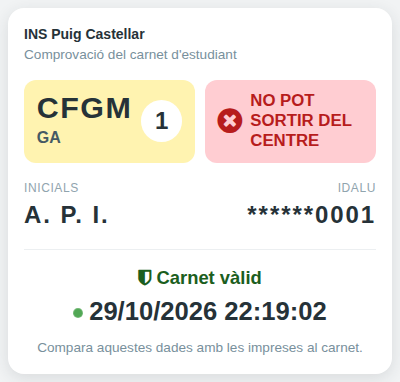
The page shows:
- The level, the study and the course year, as on the card.
- Pot sortir del centre (green) or No pot sortir del centre (red), as it is right now, even if it changed after the card was printed.
- The student’s initials and the last four digits of their IDALU. They must match the name and the IDALU printed on the card.
- Carnet vàlid, with the date and time of the check and a blinking dot. They show it is the page itself and not a screenshot.
If the level, the course, the initials or the IDALU don’t match the card, the card has been tampered with.
A card that is not valid
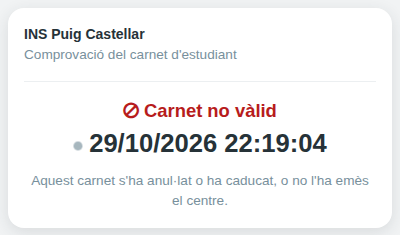
The page shows Carnet no vàlid and no data when the card has been revoked (lost or stolen), belongs to a previous academic year, or belongs to a student who no longer studies at the centre. Hold on to the card and take it to the secretary’s office.