EMS
| Català | Castellano | English |
Checking the Student’s Class Schedule
See the student’s weekly class schedule — subjects, classrooms, breaks and teachers — and download it as a PDF, from the student portal.
Access
On the portal’s home page, click the Attendance card.
If you are a family with more than one child at the school, first choose the child in the portal’s top bar: the schedule shown is always the one for the selected child.
Reading the Schedule
The grid shows one column per day, from Monday to Friday, and one row per class period. Each block shows the subject and the classroom. Below the grid, a table lists each subject and the teacher or teachers who teach it.
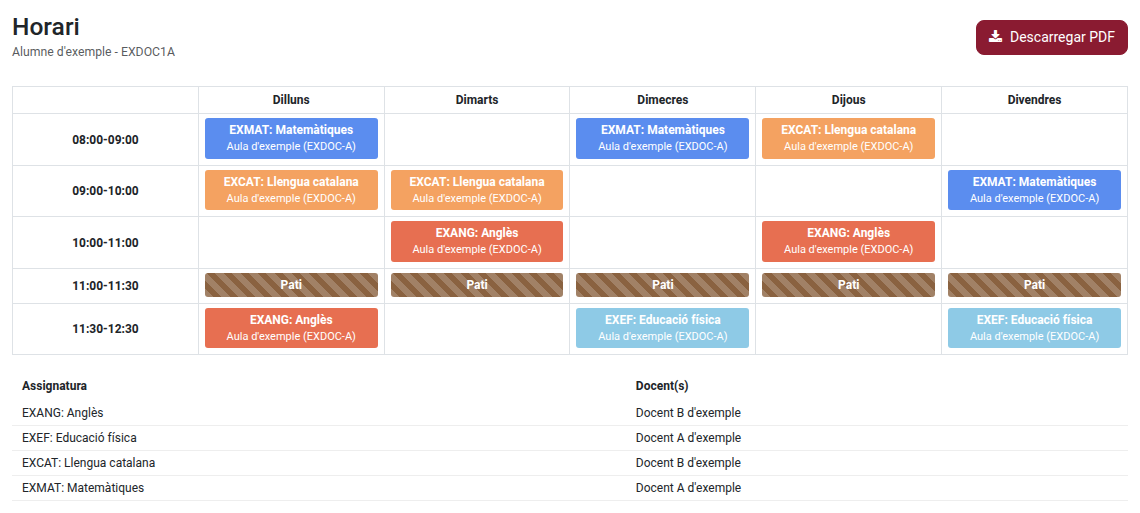
On a mobile phone, slide the grid sideways to see every day.
Downloading the Schedule as PDF
Click Download PDF to save a printable copy of the same schedule.