EMS
| Català | Castellano | English |
Actions and agreements
A meeting agreement and an improvement action are the same thing: somebody commits to doing something, by a date, and somebody has to follow it up. That is why in EMS they are one screen: Quality → Actions and agreements.
It answers in one place what do I owe and by when.
How the screen opens
With two facets already applied: Open and Current course. Remove one and you also see closed items, or earlier years.
Other useful facets: Overdue (past their deadline and still open), and by type: meeting agreements, improvement actions, or corrective and preventive ones.

Who sees and who changes an agreement
An agreement tells apart three ways of being in it:
- Whoever manages its content (what was agreed, its scope, the responsible people, the people involved, the deadline): the chain of command of the department or of the group’s tutor (Department or Seminar Chief, Head or Deputy Head of Studies, Director) and, while the minute is not approved, whoever writes or approves it. An action that comes from no minute, also whoever created it.
- The responsible people and whoever holds the responsible post: they carry its progress. They add follow-up entries with Actions → Add follow-up and write its description (how to carry it out: links, instructions), but do not change what was agreed. Their chain of command may also do it in their place. Anyone can be responsible, with or without a post.
- The people involved: those who have to do something about the agreement (for instance, the whole department updates its syllabuses). They can read it, with its follow-up. They get no notices about it: the minute already tells them what was agreed.
Whoever can read the minute it comes from, or those of its scope, can read it too. The quality committee, quality coordination and the administrator see and change them all.
An agreement you may not change opens in read-only mode.
How the responsible people hear of it
Everything reaches them in their daily summary, never as an email of its own:
- A task, Carry out the agreement, due on the deadline (or on the same day, if there is no date). It is marked as done when the agreement is closed, and disappears for whoever stops being responsible.
- A notice when you become responsible, if the deadline is later, so that you know about the agreement before the task is due.
- A notice for each follow-up entry someone else adds: who wrote it, what happened and the state it leaves the agreement in.
Each notice also says which meeting the agreement comes from, its scope, the responsible people, the deadline and its state. An agreement taken in a meeting is notified once its minute is approved; one agreed and done in that same meeting arrives as a notice that there is nothing left to do. The people involved and the chain of command get none of this.
Creating an agreement
- New.
- Fill in the subject: what was agreed.
- Set the type. For a meeting agreement, leave Agreement.
- Set the responsible post and, if needed, the responsible people. Both can be filled in: the centre’s records often say “management team and department heads” or “one person plus volunteers”, and that should not be lost.
- Set the scope: department, workgroup, group, or Centre-wide for staff-meeting agreements. The scope is what the code is numbered against.
- The deadline: put a date if you have one. If the agreement said “by the final meeting of the year”, write that in Deadline (as agreed) and leave the date empty.
- Save. The code is issued automatically:
ACORD-<scope>-<course>-<number>.
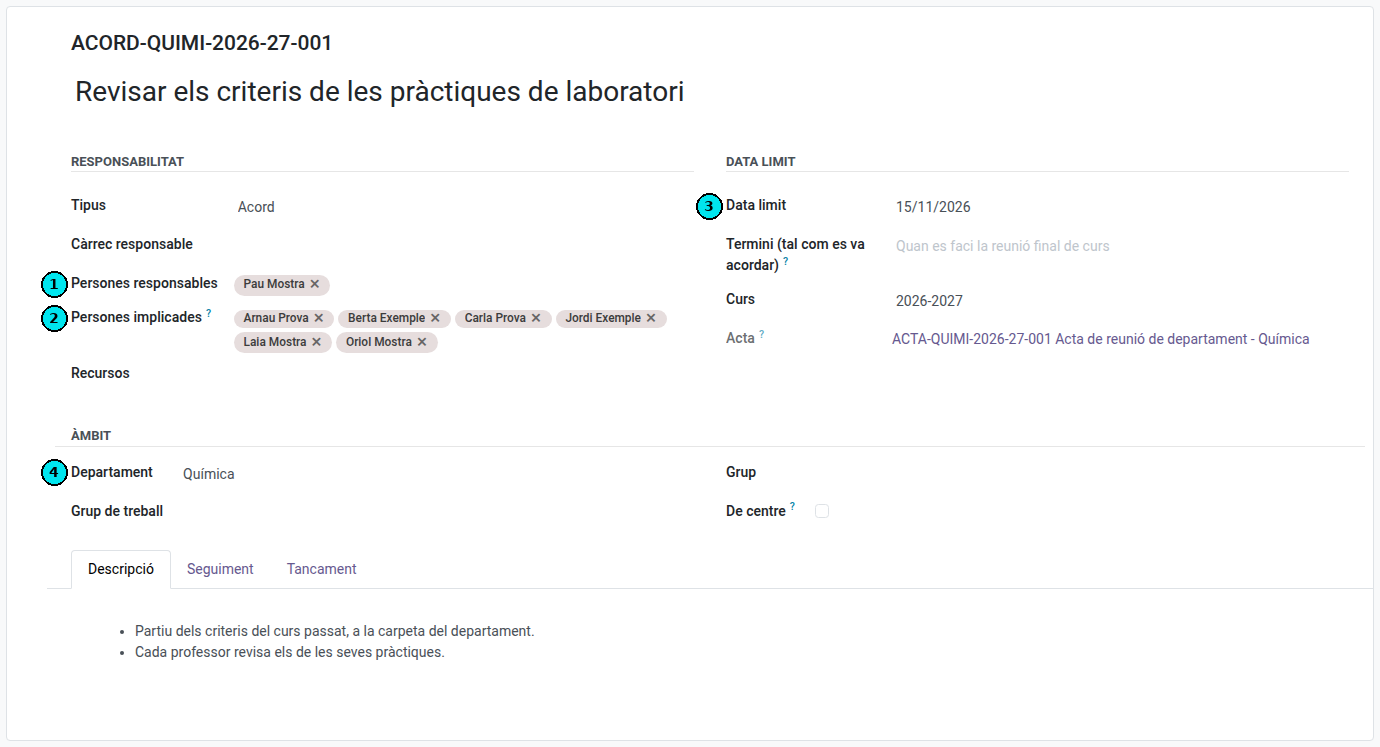
(1) The responsible people, who carry its progress; (2) the people involved, who only read it; (3) the deadline and (4) the scope.
The code and the numbering
The counter runs per scope and course, so a department’s agreements are consecutive: if a department’s list shows 003 and 005, 004 is missing and it shows. That is why there is no global number.
The state is not edited: it is derived from the follow-up
An agreement’s state is not picked from a dropdown. It comes from the latest follow-up entry:
| Situation | State |
|---|---|
| No owner and no deadline | New (pending) |
| Owner or deadline, but no follow-up yet | Analysed (planning) |
| With follow-up | The state of the latest entry |
So moving an agreement forward means adding a follow-up entry in the Follow-up tab: the date, the state it leaves it in, and what happened. This is deliberate: it forces the reason for the change to be written down, which is exactly what an audit asks for.

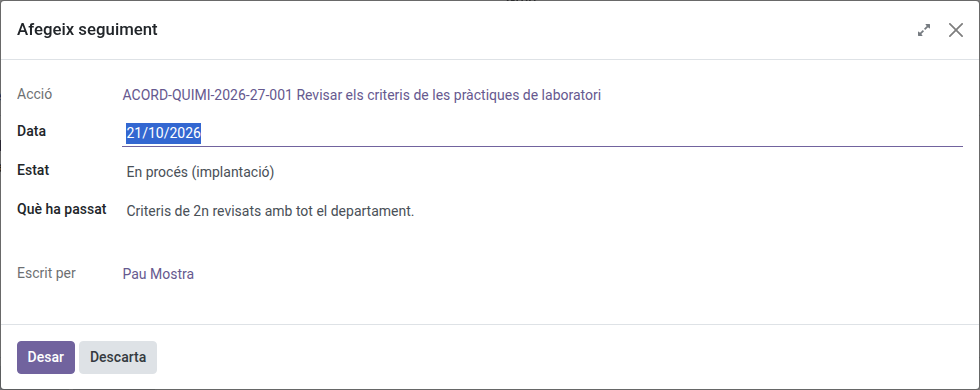
A responsible person adds the follow-up with Add follow-up, without being able to change what was agreed.
Closing an agreement
Add a follow-up entry with state Closed and say how it was resolved. The Closure tab is where the criteria go beforehand: when it will be considered finished and how efficacy will be measured.