EMS
| Català | Castellano | English |
Current Course
The Current course setting controls which academic year (e.g. 2025-2026) is used for day-to-day operations: attendance, grades, and incident tracking.
Required role: Administrator
Access
Navigate to: Settings → EMS Management → Course Management Settings
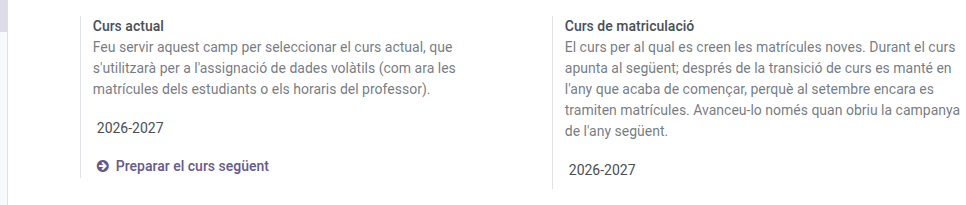
Change the Current Course
- Open Current course and pick the academic year from the list.
- Save. The change takes effect immediately across the application — attendance sessions, new grade sessions, and incident tracking all switch to the selected year.
Managing the courses
Each mark is moved with its own selector on this same page:
| Mark | What it means |
|---|---|
| Current course | The day-to-day year: attendance, grades and incidents |
| Enrollment default | The year new enrollments are created for |
Both are unique: only one course can carry each.
When to move the enrollment mark
During the year it points at the following one, which is where enrollments are being registered. After the course transition it still points at the year that has just started, because enrollments keep being processed in September for that year.
Move it on only when you open the next year’s enrollment campaign. Just pick the course in the selector: the mark is removed from the previous one automatically.
Creating a new course
If the year you need is not listed, type it in either selector and use Create and edit…: a form opens where you only fill in the start and end year. The name (2029-2030) is composed automatically.
If you move this mark by accident, new enrollments are created for the wrong year and nothing warns you. Worth checking if you see enrollments turning up where they should not.