EMS
| Català | Castellano | English |
Your Weekly Schedule
See your own weekly timetable — subjects, groups, classrooms, breaks and coordination meetings — from your own employee record.
Required role: Teacher (you can only view and export your own schedule; editing is done by a Department Chief or above)
Access
Click your avatar in the top-right corner of EMS and choose My Profile. Schedule is already the active tab when the page opens.
Reading the Schedule
Each block on the weekly grid shows:
- its exact start and end time (periods are not always aligned to the hour, e.g.
10:25–11:25), - the subject and group(s) you’re teaching — a single block can name more than one group when you’re running an identical session for several groups at once (e.g. an optional subject combining two official groups in the same room) — or the reason if it’s not a teaching period (a break, a coordination meeting…). If the subject is actually split into several distinct topics, each taught separately (e.g. a module split by language), its topic shows right after the subject (e.g. “MP 3161 - Castellà”) — contact a Department Chief or above to set or correct it,
- the classroom, when the group has one assigned.
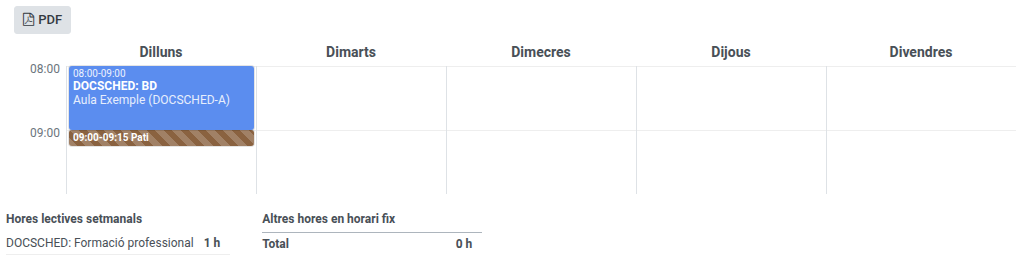
A period that has no block yet is simply not assigned — contact an Administrator if you believe something is missing or incorrect on your schedule.
A break block may show even if nobody explicitly set it up on your own schedule — it’s filled in automatically from your level’s own bell-schedule framework, as a visual aid.
The same weekday/time/room slot can occasionally show two blocks side by side instead of one — this means the slot legitimately holds two different subjects at different points in the year (e.g. a module until February, then the end-of-course project for the rest of the year), each with its own dates.
A “group” can also be a reinforcement group — a class made up of students pulled from different regular groups (or even different studies) for a specific reinforcement/support subject. It shows up on your schedule exactly like any other group.
Co-teaching
If a class is genuinely taught by more than one teacher at the same time (same subject, same group, same room, same hour), that period shows up as a shared class on both teachers’ schedules. Attendance is also shared: whichever co-teacher marks it, both of you see the same, single attendance record for that session — there’s no need for each of you to take attendance separately.
Exporting Your Schedule to PDF
Click PDF in the Schedule tab’s toolbar to download a printable version of your weekly timetable.