EMS
| Català | Castellano | English |
Managing Your Students’ Family Contacts
You can add and remove the family members (father, mother, legal guardian…) of the students in your group.
Required role: Tutor
Adding a family member
-
Open the student’s record and go to the Contacts & Addresses tab.
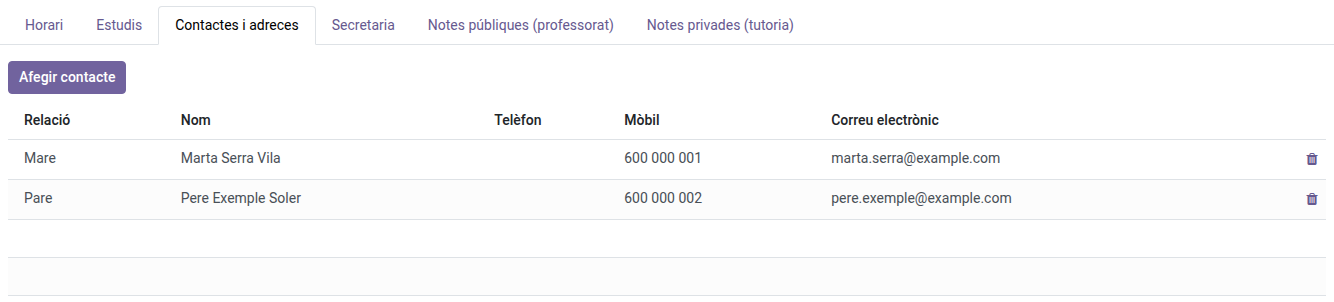
- Click Add contact.
-
Pick the relation (Father, Mother, Legal guardian…).
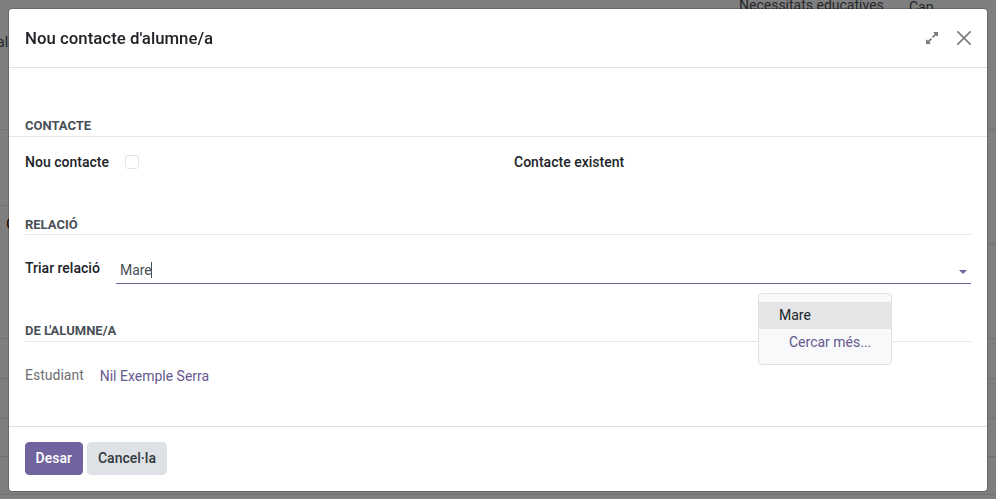
- Pick an existing contact or fill in a new one: at least a first or last name, an identity document (DNI/NIE or passport) and a phone, mobile or email.
- Save. The family member appears in the student’s contact list.
Removing a family member
- In the Contacts & Addresses tab of the student’s record, click the trash icon on the family member’s row.
- Confirm with Ok.
The family member is no longer linked to the student. If they are left related to no other student and have no portal access, their contact is deleted too; otherwise (for example, when they are a sibling’s family member too) it is kept.
You can only add and remove family members of the students you tutor.