EMS
| Català | Castellano | English |
Convalidation settings
Configure when convalidation requests can be submitted from the portal, and the texts of the official resolution the Director issues.
Required role: Administrator (Settings)
Access
Navigate to: Settings → EMS Management → Convalidations Settings
Request period
The request period sets when new convalidation requests can be submitted from the portal. It repeats every year, with no year to update: change it only if the centre changes the dates.
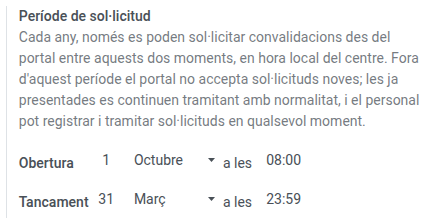
- Under Opens, choose the day, month and time the period starts.
- Under Closes, choose the day, month and time it ends. The closing minute is still part of the period.
- Save.
By default the period runs from 1 October at 08:00 to 31 March at 23:59. Times are in the centre’s local time.
The period can cross the new year, as the default one does: if the opening comes later in the calendar than the closing, it runs from the opening to the end of the year, and from 1 January to the closing.
The settings accept neither a day that does not exist in its month (not even 29 February, so the period is the same every year) nor a period that opens and closes at the same moment.
What the period limits and what it does not
| Who | During the period | Outside the period |
|---|---|---|
| Students and families, on the portal | Submit new requests, check their own, answer the centre, cancel pending ones | Everything except submitting new requests. The portal says when the period opens |
| Head of Studies, Director, secretariat | Everything | Everything: they can register paper requests and process any request at any time |
Resolution texts
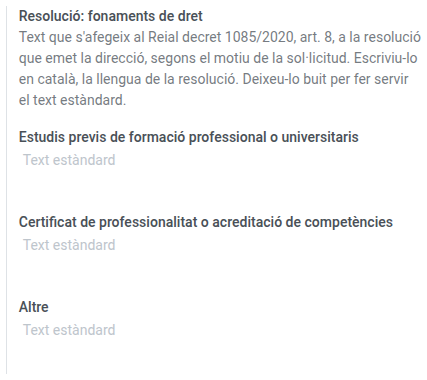
The resolution the Director issues is always generated in Catalan. Three settings adjust its content:
| Setting | What it does |
|---|---|
| Resolution: grounds of law | One text for each request ground (prior studies, professional certificate, other), added to Royal Decree 1085/2020, article 8. |
| Resolution: appeal | The footer saying how and before whom the resolution can be appealed. |
| Resolution: signed by delegation | When checked, the resolution says Per delegació and shows the name of whoever resolved it instead of whoever holds the Director position. |
An empty text means the standard one is used. The standard appeal text names the competent body only in general terms: write the specific body once the centre has confirmed it. Write the texts in Catalan, the resolution’s language.
- Write the texts you want to customise and, if needed, check Resolution: signed by delegation.
- Save.
Changes apply to resolutions issued from then on.
See Convalidations for how requests are processed, and the families’ manual for what students see.