EMS
| Català | Castellano | English |
Importing Grades from Esfera
Required role: Administrator
What This Is
The official grades of every group live in Esfera. At the end of each evaluation you export them from Esfera as an xlsx file and load them here, so that EMS holds exactly the grades that were officially recorded. You will find it under Planning and Grading → Grades → Import grades.
The import accepts both layouts Esfera produces (the flat Notes Flat sheet and the pivoted Notes one) and covers the three kinds of grade at once: learning outcomes (RA), work placement (EM) and the module’s final grade (MP).
Before You Import
The grade sessions must already exist for that group, those modules and that evaluation. Create them first with Create grade sessions; without them the import has nowhere to put the grades and every line fails.
Import each evaluation into its own round, in chronological order. The third evaluation goes into round 3 and the fourth (second sitting) into round 4. Beware of Esfera’s own naming: its files say av_2 for what we call the third evaluation and av_3 for the fourth.
Importing
- Pick the evaluation (the round the file belongs to).
- Pick the xlsx file exported from Esfera.
- Decide whether to tick Create missing enrollments (see below).
- Click Import grades.
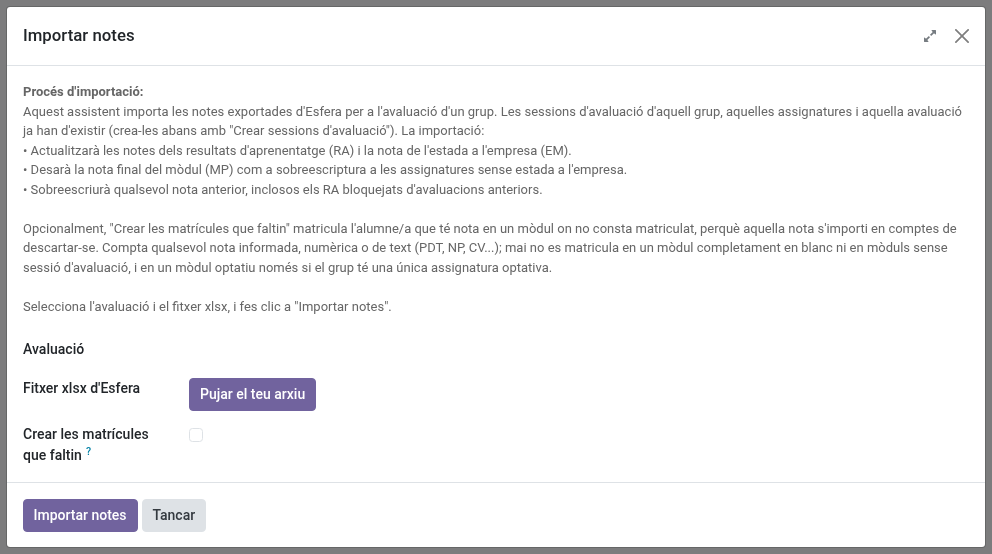
When it finishes you get a summary of what was applied and a CSV log you can download, listing every grade one by one, along with any that could not be applied and why. Keep that log: it is the record of what the import changed.
Create Missing Enrollments
Esfera lists every module of the cycle in each student’s report, while EMS only records the modules a student is actually enrolled in. When the two do not agree — the student has a grade in Esfera but no enrollment in EMS — that grade has nowhere to go and is discarded, with a “not enrolled” note in the log.
Ticking this box lets the import fix that by enrolling the student. It is off by default, and it only acts where the gap is nearly certain to be a genuine mistake:
- It does enrol whenever the module carries any grade at all, whether numeric or textual (
PDT,NP,CV…). A textual grade is still a grade:PDTandNPsay the module is not passed andCVsays it is convalidated, but all of them mean the module is part of that student’s record. - It does not enrol when the module is left entirely blank — that is how Esfera lists the modules a student does not take.
- For optional modules it depends: Esfera’s code for the optional never matches the centre’s own, so the only way to identify it is by elimination. If the group has a single optional being graded, it enrols there; if it has two or more, nothing is created and you get a warning, because there is no way to tell which one the student takes.
- It does not enrol when the module has no evaluation session in the group. Create the session first.
- If the student is already enrolled in that module in a different group, nothing is created and you get a warning: that is an inconsistency to look at by hand, not one to fix by adding a second enrollment.
Every enrollment created is counted in the result and appears in the CSV log marked ENROLLMENT / CREATED. Note that enrolling a student also adds them to that module’s attendance lists, which is the expected outcome: if they take the module, they belong there.
When to use it: when you know the enrollments in EMS have gaps and you would otherwise have to fix them one by one before importing. If you would rather review them yourself first, leave the box unticked, run the import, and use the CSV log — it lists every grade that had nowhere to go.
Modules Taught in Another Group
A student does not always take every module with their own group. Two situations are routine:
- Split groups — the group is divided for some modules and the second half is a group of its own (
AIF1BalongsideAIF1A). - Repeaters — a second-year student retaking a first-year module attends it, and is graded, with the first-year group.
The import follows the enrollment to find where each grade belongs, so these grades land in the right session without you having to do anything. You can import a single group’s file and its students’ grades from other groups will still be placed correctly.
If a student appears enrolled in the same module in two groups, the import warns you, naming the student, the module and the groups. It does not stop, but that grade could end up in either of the two sessions, so it is worth resolving: a module is attended in one group, and the extra enrollment should be removed.
What Gets Overwritten
The file is the official record, so the import takes precedence over what is in EMS:
- Any previous grade is overwritten, including outcomes locked because they were already passed in an earlier evaluation. Only the line being imported is unlocked; the earlier evaluations keep their history untouched. The result tells you how many locks were released.
- Module finals: for modules without work placement, the file’s final grade is stored as an override. For modules with work placement, EMS recomputes the final from the outcomes and the placement grade, so the file’s value is only compared — if it differs, you get a warning instead of a silent change.
- Non-numeric grades (
PQ,NP,PDT,NA,CV…) are recorded as “not graded” rather than as a zero.