EMS
| Català | Castellano | English |
Marking a graduation and registering a withdrawal
This guide explains the two ways a student leaves the school — graduation (marked in advance, takes effect later) and withdrawal (immediate) — and what each one actually does.
Contents
- Two different actions, two different timings
- Marking a graduation
- Registering a withdrawal
- What a withdrawal does, step by step
Two different actions, two different timings
- Graduation is a deferred mark: you flag now that a student will graduate, but nothing else changes immediately — they keep attending classes, keep their group, keep their portal access. The actual conversion to alumni happens later, at the course transition.
- Withdrawal is immediate: the student leaves today. Their group, subjects, and portal access are all removed as part of the same action.
Select one or more students (from the list or a single student’s form) and use Actions → Graduation or Actions → Withdrawal — both also appear as a button on the student’s own form.
Marking a graduation
Only students in the last course of their study can be marked (e.g. 2nd of CFGM/CFGS/Batxillerat, 4th of ESO) — the wizard shows why a student can’t be marked yet if that’s not the case (not in the last course, or already enrolled for next course, which is treated as incompatible with graduating). Tutors can mark their own tutorands; secretary and admin can mark anyone.
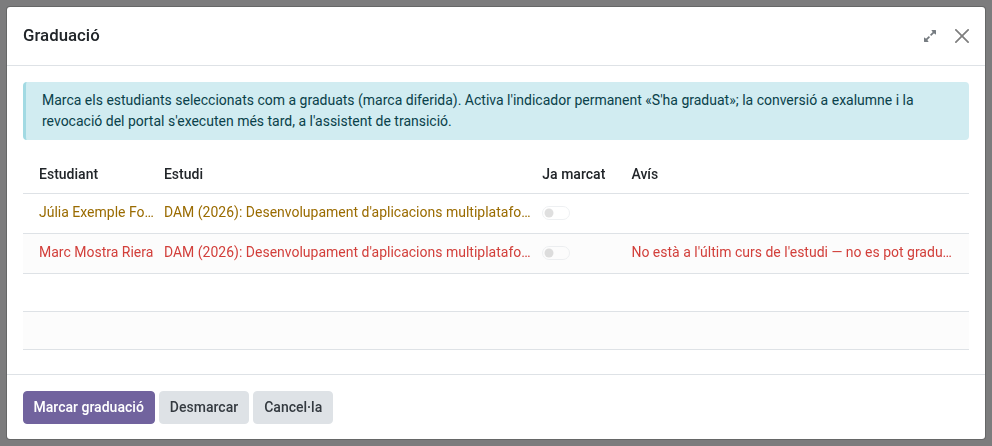
Marked a student by mistake? Unmark reverses it — except the internal “has graduated at least once” record, which is permanent and is what decides alumni-vs-withdrawal if that student ever leaves later on. Unmarking never undoes that.
Registering a withdrawal (or an expulsion)
Only secretary and admin can register one. You’ll be asked to choose between Withdrawal and Expulsion, the exit date and, optionally, a reason — then confirm. This cannot be undone from the wizard itself once applied.
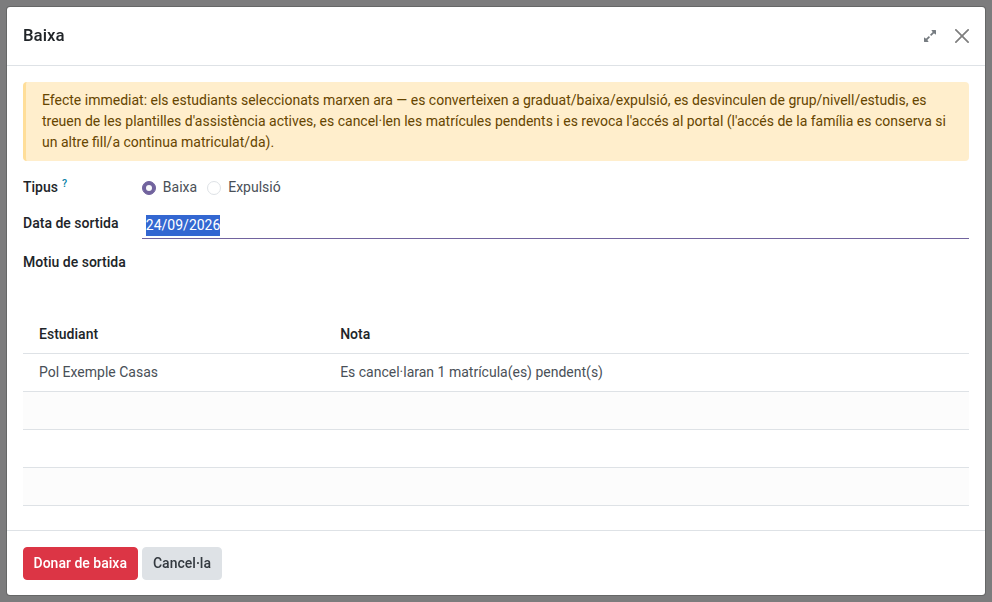
- Withdrawal covers the student leaving on their own, whether that’s their own decision or the school’s administrative decision (“de oficio”) — there’s no separate option for that distinction, just note the specific circumstances in the reason field.
- Expulsion is for a student permanently expelled from the centre. It goes through the exact same steps below as a withdrawal (same cancellations, same history freeze, same portal revoke), the only difference is the final result: Expelled instead of Withdrawal — shown as a red ribbon on the student’s record, at a glance, alongside Alumni (green) and Withdrawal (orange) for every other former student.
- The confirm button’s label changes to match your choice (“Withdraw” or “Expel”).
Archiving a student from the generic Archive action (list or form) opens this same wizard automatically — there is no separate “just archive” path for an active student; this wizard is what archiving means for a student.
What a withdrawal (or expulsion) does, step by step
- Any pending enrolment (draft or sent, not yet confirmed) for that student is cancelled.
- Their academic history is frozen at that exact moment — everything done up to that day (subjects, grades, attendance) is kept permanently, with the result Withdrawn.
- They are removed from everything operational: subject enrollments, live grading sessions, attendance sheets and templates, and the group’s delegate role if they held it.
- If you chose Expulsion, they become Expelled — always, regardless of any earlier graduation mark. Otherwise, they become alumni if they had ever been marked as graduated (even long ago), or withdrawal otherwise.
- Their portal access is revoked — and their family’s too, unless a family member still has another child actively enrolled at the school (a sibling keeps the family’s access working).
- The student’s record is archived.
- Their corporate Google account is scheduled for suspension: EMS emails the student (personal and corporate address) telling them the account will be suspended in 30 days and deleted 30 days after that, and shows both dates on their record as they are set.
The corporate Google account after a withdrawal
The account is not touched the day the student leaves — it keeps working for 30 days, then is suspended, and 30 days after that it is deleted for good (mailbox and Drive files included).
On the student’s record, at the top:
- Cancel scheduled deactivation — keeps the account even though the student has left.
- Suspend Google account — suspends it straight away, without waiting out the 30 days. This also starts the 30-day countdown to deletion.
- Delete Google account — deletes it for good, without waiting. Asks for confirmation first; it cannot be undone.
- Reactivate Google account — brings a suspended account back and calls off its deletion.
Bringing the student back (unarchiving the record) does the same automatically: it calls off whichever step was scheduled, or reactivates the account if it was already suspended. If the account had already been deleted, a new one is created with fresh credentials.
To see every student with something pending, go to Educational Community → Students and use the Google suspension pending or Google deletion pending filters. Both dates are available as optional columns in the list view (the toggle at the right end of the header row), so you can sort by them; Group By → Google suspension date groups them by month.
If the portal access can’t be revoked for some reason, the student is not archived — you’ll see that flagged in the confirmation message, and can retry once the underlying issue is resolved.