EMS
| Català | Castellano | English |
Studies
Studies represent the concrete study programmes offered by the institution (e.g., DAM, DAW, ASIX). Each study belongs to one Level and groups the Subjects that make it up, together with its official curriculum documents.
Required role: Administrator
Access
Navigate to: Educational Community → Configuration → Curriculum → Studies
View All Studies
Opening the menu shows a list of all studies sorted by code. Each row shows the code, acronym and name.
Create a Study
- Click New.
- Fill in the required fields:
- Acronym (required): Short code used across the system (e.g.,
DAM,DAW). - Name (required): Full descriptive name.
- Level (recommended): The educational level this study belongs to.
- Code (required): Official code, must be unique (e.g.,
CFGS_ICB0). - Release Date (required): Date the curriculum was published.
- Deprecated: Leave unchecked for an active study; check it to retire a study without deleting it.
- Acronym (required): Short code used across the system (e.g.,
- In the Subjects tab, add the subjects that make up this study.
- In the Attached files tab, attach curriculum reference documents (official gazette publications, guidance documents, etc.).
- Optionally, add free-form notes in the Notes tab.
- Click Save (or use the breadcrumb to navigate away — Odoo saves automatically).
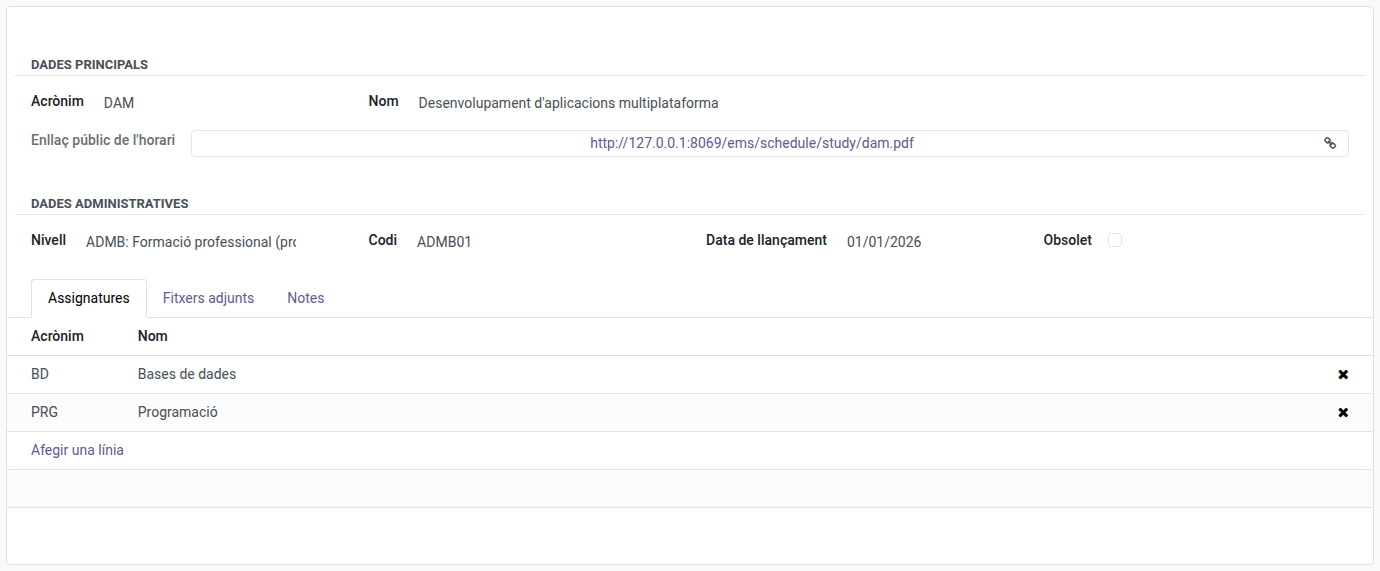
Edit a Study
- Open the study from the list.
- Click any field to edit it inline, or click Edit if required.
- Make your changes.
- Click Save.
Public Link to the Study’s Schedules
Every study with active groups has a public link to a single PDF with the weekly schedule of all of them, one after another by course and group (e.g. SMX1A, SMX1B… then SMX2A, SMX2B…). Anyone can open it without logging in to EMS, so the centre’s website can link one PDF per study.
- Open Educational Community → Configuration → Curriculum → Studies → [a study].
- In the Public schedule link field (e.g.
.../ems/schedule/study/smx.pdf), click the link to open the PDF in a new tab, or click the button on its right to copy the link.
The PDF always includes the study’s current active groups, each with its schedule as shown by its own public link (see A Group’s Weekly Schedule), so the link never needs to be replaced when groups change from one year to the next. The link is built from the study’s acronym: if the acronym changes, the link changes too.
Retire a Study
Studies are rarely deleted, since doing so is blocked once other records (enrolments, groups, grades) reference them. To stop offering a study while keeping its history:
- Open the study.
- Check the Deprecated field.
- Click Save.
Delete a Study
- Select the study in the list (tick the checkbox on the left).
- Click the Action menu (⚙) and select Delete.
- Confirm the deletion in the dialog.
Warning: A study cannot be deleted if it has linked records elsewhere in the system (enrolments, groups, planning…). Use Deprecated instead in that case.