EMS
| Català | Castellano | English |
A Group’s Weekly Schedule
See a group’s full weekly timetable — subjects, teachers, classrooms and breaks — built automatically from the schedules already set up for each teacher, from the group’s own record.
Required role: any staff role with access to Groups (Administrator, Secretary, Teacher, Group Tutor, Head of Studies…) — everyone who can open a group can see its schedule.
Access
Navigate to: Groups → [a group] → Schedule tab
Reading the Schedule
The group’s weekly grid is not stored on its own — it is assembled from every teacher’s schedule that includes this group, so it is always up to date with whatever is set on the Employees → [teacher] → Schedule tab. Each block shows:
- its exact start and end time (periods are not always aligned to the hour),
- the subject being taught — followed by its topic (e.g. “MP 3161 - Castellà”), when the teacher set one on their own Schedule tab. A subject actually split into several distinct topics, each taught by a different teacher (e.g. a module split by language), shows one block per topic instead of merging them together,
- the break (patio), when the group’s level and shift make it possible to work out its time — a reinforcement group, or one without a shift assigned, may simply not show a break block.
Below the grid, a Subject → Teacher(s) table lists every subject (and, when set, topic) taught to this group and who teaches it — a subject split into topics shows one row per topic. When a subject (or subject+topic) is co-taught by more than one teacher at the same time, all of their names appear together in that row — the grid itself still shows that subject only once, not once per teacher.
Day, hour, subject, teacher(s) and groups can only be changed from the relevant teacher’s own Schedule tab. Topic and classroom, however, can also be edited directly here — see below.
Editing a Block’s Topic or Classroom
Required role: Department Chief and above (Head of Studies, Deputy Head of Studies, Director, Academic Administrator).
Instead of going teacher by teacher, you can correct a subject’s topic or classroom for this group directly from this tab:
- Click Edit in the Schedule tab’s toolbar — each day’s blocks turn into cards, the same way they do on a teacher’s own Schedule tab when editing.
- On any class’s card, change the Topic and/or pick a different Classroom. Every other detail on the card (day, time, subject, teacher(s)) is shown for reference only and can’t be changed here — to move a class to a different day/time or reassign it to another teacher, use the teacher’s own Schedule tab instead. A break/guard-duty/meeting card has neither field to edit at all.
- Click Save to apply every change at once, or Cancel to discard them.
If a class is co-taught by more than one teacher, both teachers’ own calendars are updated together, so they never end up showing a different classroom for the same class.
If the new classroom is already in use elsewhere at that exact day and time, the change is never blocked: the block is left in its previous classroom and flagged for review — the same “pending classroom” notice and resolution assistant already used when a group’s own reference classroom changes takes care of it (see Resolving a Pending Classroom Conflict).
Exporting the Schedule to PDF
Click PDF in the Schedule tab’s toolbar to download a printable version of the group’s weekly timetable, including the Subject → Teacher(s) table. The header shows the group’s tutor and reference classroom, when set.
Public Link to the Schedule PDF
Every active group has a public link to its schedule PDF, which anyone can open without logging in to EMS — use it, for example, to link each group’s timetable from the centre’s website.
- Open Groups → [a group].
- In the Public schedule link field (e.g.
.../ems/schedule/eso1a.pdf), click the link to open the PDF in a new tab, or click the button on its right to copy the link.
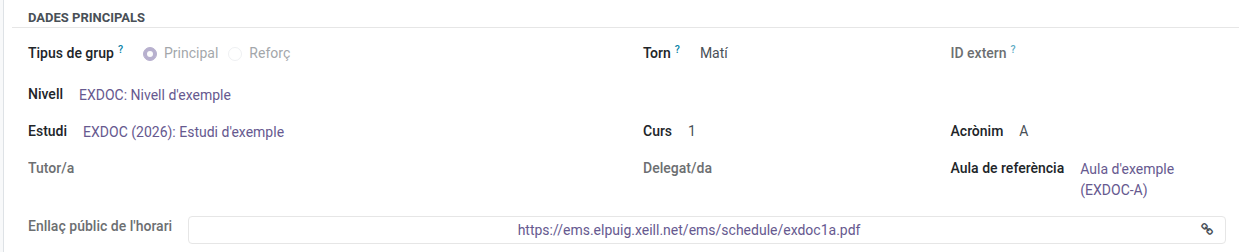
The PDF behind the link is updated automatically a few seconds after any change to the group’s schedule, so the link never needs to be replaced. The link is built from the group’s name: if the group is renamed, the link changes too. An archived group’s link stops working.
To link the schedules of every group of a study with a single PDF, use the study’s own public link instead (see Studies).