EMS
| Català | Castellano | English |
Surveys: LimeSurvey Integration
Required role: Administrator or Quality coordinator (see Visibility below for the difference between the two)
What a Survey Is
EMS’s Surveys feature (Communications → Surveys) generates and manages LimeSurvey questionnaires for students, teachers or ASP staff — evaluation/satisfaction surveys sent out and tracked without leaving EMS. Not to be confused with Odoo’s own native Surveys app, which is hidden in this installation.
The Survey Lifecycle
A survey moves through a fixed sequence of states as you work through it:
- Draft — define the survey’s Title, Description, Target (Students / Teachers / ASP) and its content Blocks (the questions/sections, as tab-separated templates).
- Compute recipients — EMS works out who should receive the survey (filtered by Level/ Study/Group, or by special per-subject/per-internship rules on individual blocks) and builds the Recipients list, each with their own enrollment snapshot.
- Upload — the survey and its recipients are created in LimeSurvey itself via its API.
- Open — the survey is live; recipients can respond. Use Remind to resend the invitation to anyone who hasn’t answered yet.
- Close — stops accepting responses.
- Download — pulls the response data back into EMS as a CSV, ready for analysis (e.g. in Metabase).
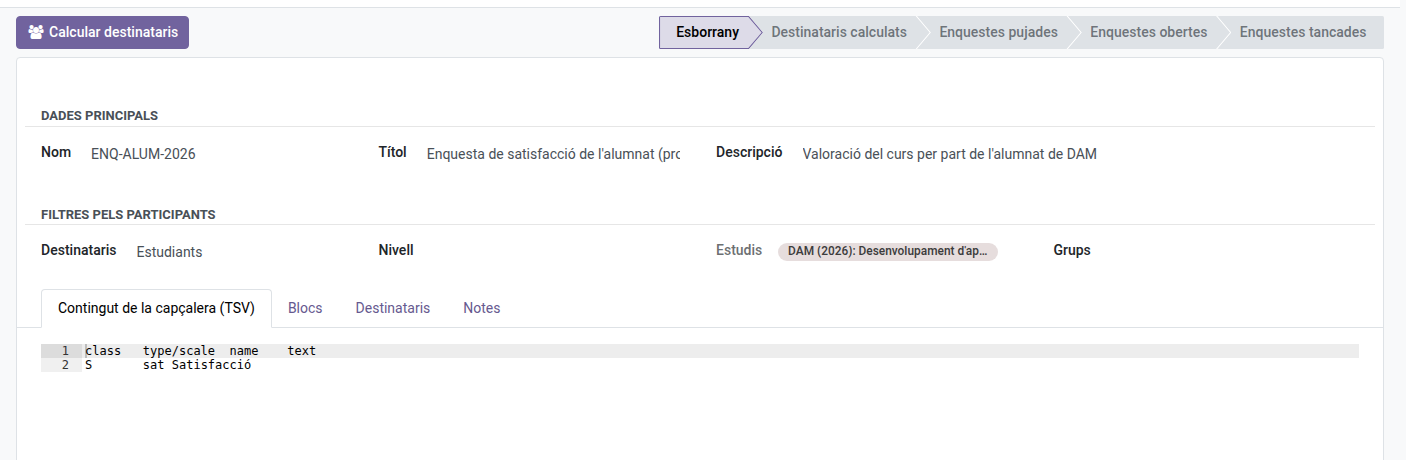
You can return an uploaded/computed survey to Draft (recomputing recipients from scratch) at any point before it’s closed.
Visibility: Who Sees Which Surveys
Everyone with access to Surveys — Administrators and the Quality coordinator alike — sees every survey centre-wide, but the list always opens filtered to “Show only mine” by default (a tag in the search bar), so day to day everyone comfortably works with just their own. Removing that filter reveals every survey centre-wide, for whenever you need to check on someone else’s work.
- Administrators can fully manage every survey regardless of the filter — it only affects what’s shown by default, not what they’re allowed to do.
- The Quality coordinator can only create, edit or delete the surveys they personally created — someone else’s survey opens in read-only mode even with the filter removed.
- A plain Quality team member (not the coordinator) keeps unrestricted create/edit access to every survey, same as before — this distinction only applies to the coordinator role.
If your account isn’t linked to a teacher and you’d rather never see “Show only mine” checked, remove it once and use the search bar’s Favorites → Save current search, ticking Default filter — Odoo remembers that per login from then on.
Deleting a Survey
- A survey can be deleted while in Draft, Recipients computed, or Closed state.
- Deleting a Closed survey also permanently deletes it from LimeSurvey — if the response data hasn’t been downloaded yet, it is lost for good. EMS asks for confirmation before doing this.
- A survey that is Uploaded, Open, or otherwise mid-flight cannot be deleted directly — close it first.