EMS
| Català | Castellano | English |
Teacher Roles and Permission Levels
Teachers gain elevated access by being assigned a role. Each role that carries a permission level automatically grants the corresponding security group to the teacher’s user account — there is no need to edit user permissions directly.
Required role: Administrator
Permission Levels
Permission levels form a hierarchy — each level includes all the permissions of the ones before it:
Teacher → Tutor → Department Chief → Head of Studies → Director → Administrator
| Role | Permission level granted | How it is assigned |
|---|---|---|
| (none) | Teacher | Default for every teacher |
| Tutor | Tutor | Automatic — set when the teacher is assigned as the tutor of a Class Group |
| Department chieff | Department Chief | Automatic — set as Department Chief on the department’s own form |
| Seminar leader | Department Chief | Automatic — set as Seminar Chief on the department’s own form |
| Head of studies / Deputy head of studies | Head of Studies | Automatic — set as Area Manager on a top-level department’s own form (Role = Head of studies/Deputy) |
| Secretary | (Secretary block — see note below) | Automatic — set as Area Manager on the ASP department’s own form (Role = Secretary) |
| Director | Director | Automatic — set as Director in Settings > EMS Management |
| TAC coordinator | (TAC block — see note below) | Manual — added to the Roles field on the teacher’s own record |
| Guidance coordinator | (Guidance block — see note below) | Manual — added to the Roles field on the teacher’s own record |
Department Chief currently grants the same permissions as Tutor, plus the ability to create, edit and delete Class Groups (Contacts → Groups). It exists as its own level so it can be extended independently in the future. Seminar leader is granted the same permission level. Both can also see, read-only, the identity document and social security number of the staff in their own chain of command (Private Information tab, Identification group).
Secretary is not part of this ladder. It grants access to a completely separate permission block (Secretary: Manager/Administrator), unrelated to the Teacher→…→Director chain above — even though it’s configured the same way (as an “Area Manager” on a top-level department’s form), it does not sit at any particular rung of this ladder. The Secretary also holds Odoo’s HR permissions: they can create and edit every staff member’s record, ASP and teachers alike, private information included, but not delete it.
Guidance coordinator is not part of this ladder either. It grants its own separate permission block (Guidance: Manager/Administrator) and, like the TAC coordinator, it is assigned by hand from the teacher’s own Roles field. It is not unipersonal: the post is normally held by a team. It grants read-only access to every student’s data centre-wide - grades, academic history, daily attendance and its issues, strikes, contacts, enrolments and authorizations - and, as its only write access, setting the special educational needs (NEE) of any student or applicant. It gives no access to invoices or payments. The Coexistence coordinator grants the same read access, without the NEE, plus every strike in the centre. The academic history needs no role at all: every teacher can read it. See Consulting a Student’s Academic Data.
TAC coordinator is not part of this ladder either. It grants its own separate permission block (TAC: Manager/Administrator), and unlike every other role in this table it is assigned by hand, from the teacher’s own Roles field. It grants two things: the ability to create and edit teacher records in full, private information included (the same right the Head of Studies gained), and to create, suspend and reset the password of any student’s Google account and view their credentials. Nothing else from the ladder above. It is not unipersonal: the post can be held by a team of several teachers at once.
Head of Studies, Deputy and Director can now create and edit teachers. Until recently only the Administrator could; see Creating and Editing Teachers. Deleting a staff record and managing ASP staff both remain exclusive to the Administrator.
Tutor permissions escalate up the hierarchy. A tutor’s Seminar Chief, Department Chief and Head of Studies (or Deputy) hold every permission of that tutor over the tutor’s students; the Director holds them over the students of every tutor. Only the tutor’s own chiefs, not those of other departments or areas. “My students” lists still show only their own groups.
Access
Navigate to: Employees → [open the teacher’s record]
Customizing a Role’s Color
Each role in the catalog has a color, shown as a badge wherever a teacher’s roles are displayed (their employee form, the employee kanban card). To change it:
- Navigate to Educational Community → Configuration → Teachers → Roles (or → ASP → Roles for ASP staff roles).
- Open the role and click its color swatch — pick any color you like, there is no fixed list to choose from.
- Click Save.
The badge automatically shows the color you picked with readable text, whatever shade you choose.
Assign a Role
- Open the teacher’s employee record.
- In the Roles field, add the role that matches the permission level to grant (e.g. Department chieff).
- Click Save (or navigate away — Odoo saves automatically).
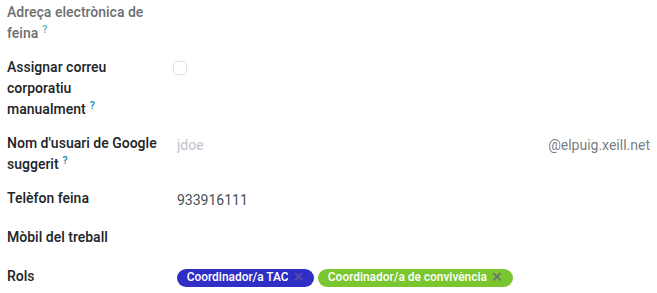
The teacher’s user account is updated immediately: the security group tied to the role is granted, together with everything it implies (e.g. assigning Department chieff also grants Tutor and Teacher access).
The Tutor, Department chieff, Seminar leader, Head of studies, Deputy head of studies, Secretary and Director roles cannot be added or removed manually — neither from here, nor from the role’s own Assigned to list (Educational Community → Configuration → Teachers/ASP → Roles), nor through any bulk edit or import. Trying any of these shows a message naming exactly where the change actually has to be made instead. Tutor is managed automatically based on whether the teacher is set as the tutor of a Class Group; the next five are managed automatically from a department’s own form; Director is managed automatically from Settings (see below).
Remove a Role
- Open the teacher’s employee record.
- In the Roles field, remove the role.
- Click Save.
The corresponding security group (and anything only that role justified) is revoked from the teacher’s user account.
Permissions granted directly on the user account are kept. If a permission was given by hand in Settings → Users (for example, Secretary access for a teacher who isn’t the Secretary’s Area Manager), changing the teacher’s roles or updating EMS does not remove it. The one exception: if the teacher later loses a role that grants that same permission, it goes with the role, since there is no way to tell the two apart. In that case, grant it again by hand.
Assigning a Department Chief / Seminar Chief
Unlike the other roles above, Department chieff and Seminar leader are not set from the teacher’s own record — they are set from the department:
- Navigate to Employees → Departments and open the department.
- Set Department Chief (the department’s
Managerfield) and, optionally, Seminar Chief. Only teachers and administrative/services staff appear in this field — a technical or system account is never a valid choice. - Click Save.

This has an immediate, automatic effect on every teacher in that department:
- Every teacher in the department, except the Department Chief, gets their Manager set to the Seminar Chief.
- The Seminar Chief’s own Manager is set to the Department Chief.
- If no Seminar Chief is set, every teacher in the department (except the Department Chief) gets their Manager set directly to the Department Chief instead — the Seminar Chief level is simply skipped.
- The Manager field on a teacher’s own record is read-only — it can only be changed by editing the department, never directly on the teacher’s record.
- Reassigning either role to a different teacher automatically revokes it from whoever held it before (in that department).
Note for existing departments: a department created before this feature was enabled may have no Department Chief and/or Seminar Chief until an admin opens it and sets them — nothing is filled in automatically. A department can also be left with no Department Chief at all (e.g. mid course-transition, after removing the outgoing Chief and before assigning a replacement) — it isn’t required to save the form.
Customizing a Department’s Color
Each department also has its own color, shown as a swatch on the department’s list, form and kanban views. To change it:
- Navigate to Employees → Departments and open the department.
- Click its color swatch — pick any color you like, there is no fixed list to choose from.
- Click Save.
A department with no Chief of its own (Shares Manager with Parent)
Not every department needs its own Department Chief. If a department is small enough to be managed directly by its parent department’s own Chief/Area Manager, tick Shares Manager with Parent instead of setting a Department Chief:
- Navigate to Employees → Departments and open the department. It must already have a parent department.
- Tick Shares Manager with Parent — this clears the Manager field and hides it, since the department no longer has one of its own.
- Click Save.
Every teacher in that department (and, if it itself has sub-departments, their own Department Chief too) gets their Manager set to the nearest ancestor department’s own Chief/Area Manager — climbing up the hierarchy as many levels as needed until one is found. A department cannot have both its own Manager and this checkbox ticked at the same time.
Assigning an Area Manager (Head of Studies / Deputy / Secretary)
Some departments (currently VET, ESO/BTX and ASP) are top-level departments — this changes their form:
- Navigate to Employees → Departments and open the department. The Top-level Department checkbox is already ticked for VET, ESO/BTX and ASP.
- The department can no longer have a parent department, and has no Seminar Chief — instead of “Department Chief”, the Manager field is labelled Area Manager.
- Choose the Area (required): Academic (VET, ESO/BTX) or ASP. This determines which Role you’re allowed to pick next.
- Set the Area Manager (required) and choose their Role: Head of studies or Deputy head of studies for an Academic area, Secretary for an ASP area — picking a Role that doesn’t match the Area is rejected.
- Click Save.
Which Area/Role to pick depends on the department: VET and ESO/BTX are Academic areas, so their Area Manager is normally Head of studies or Deputy; ASP is different — its Area is ASP, its Area Manager is a teacher coordinating the administrative/secretariat staff, so its Role should be Secretary (this grants the separate Secretary permission block, not an academic one — see the note under the permission table above).
This has an effect beyond the department itself:
- Every other department placed under a top-level department (e.g. “Computer Science” under VET, or “Secretariat”/”Conciergerie” under ASP) has its own Department Chief’s Manager automatically set to the top-level department’s Area Manager. Nothing else about that department changes — its own teachers and Seminar Chief keep working exactly as before, only its own Department Chief’s Manager changes.
- Since Head of studies, Deputy head of studies and Secretary can each only be held by one person centre-wide, trying to set the same one on two different departments for two different people is rejected — clear the other assignment first if you need to reassign.
Note for existing departments: VET, ESO/BTX and ASP are already marked as top-level, but with no Area Manager set yet — an admin must open each one and set it manually; nothing is filled in automatically.
Assigning the Director
Unlike every other role above, the Director is not set from any teacher’s record or any department form — it is configured centre-wide from Settings:
- Navigate to Settings → EMS Management → Center Data.
- Set the Director.
- Click Save.
This has an effect beyond the setting itself:
- The Manager of every top-level department’s Area Manager (e.g. VET’s, ESO/BTX’s, ASP’s) is automatically set to the Director.
- The Director’s own Manager is always left blank — nobody ever ranks above the Director, regardless of which department they nominally belong to, whether they head one themselves, or whether they’re simply a regular member of one whose Chief is someone else.
- Reassigning the Director to someone else automatically revokes the role from whoever held it before.
Note on access: the Settings screen requires Odoo’s Settings access (granted through the “Settings Administrator” group or root/admin) — this is a different permission from the one that controls the department forms above. Someone with full academic access is not automatically able to reach Settings.
Note for existing installations: no Director is set by default — an admin must configure one manually; nothing is filled in automatically.