EMS
| Català | Castellano | English |
Updating student data from a CSV file
This guide explains how to bulk-update fields on already-enrolled students from any CSV file — not tied to a specific external system’s format, unlike the Esfera or GEDAC imports.
Contents
- When to use this instead of the Esfera import
- Running the update
- Mapping the columns
- Updating the bank account
- Reading the result
When to use this instead of the Esfera import
Use this tool when you have any CSV with student data to apply — e.g. a corrected phone/address list, a file handed over informally — and don’t need (or don’t have) a full Esfera export. It only updates existing students: a row whose ID doesn’t match anyone is skipped and reported, never used to create a new student. For a full refresh from the official Esfera/SAGA system (which can also create new students and family contacts), use Importing students from Esfera (SAGA) instead.
Running the update
From the Students list, open the actions menu (the gear icon ⚙️) and choose Update students from CSV. Upload your file and click Load columns.
Mapping the columns
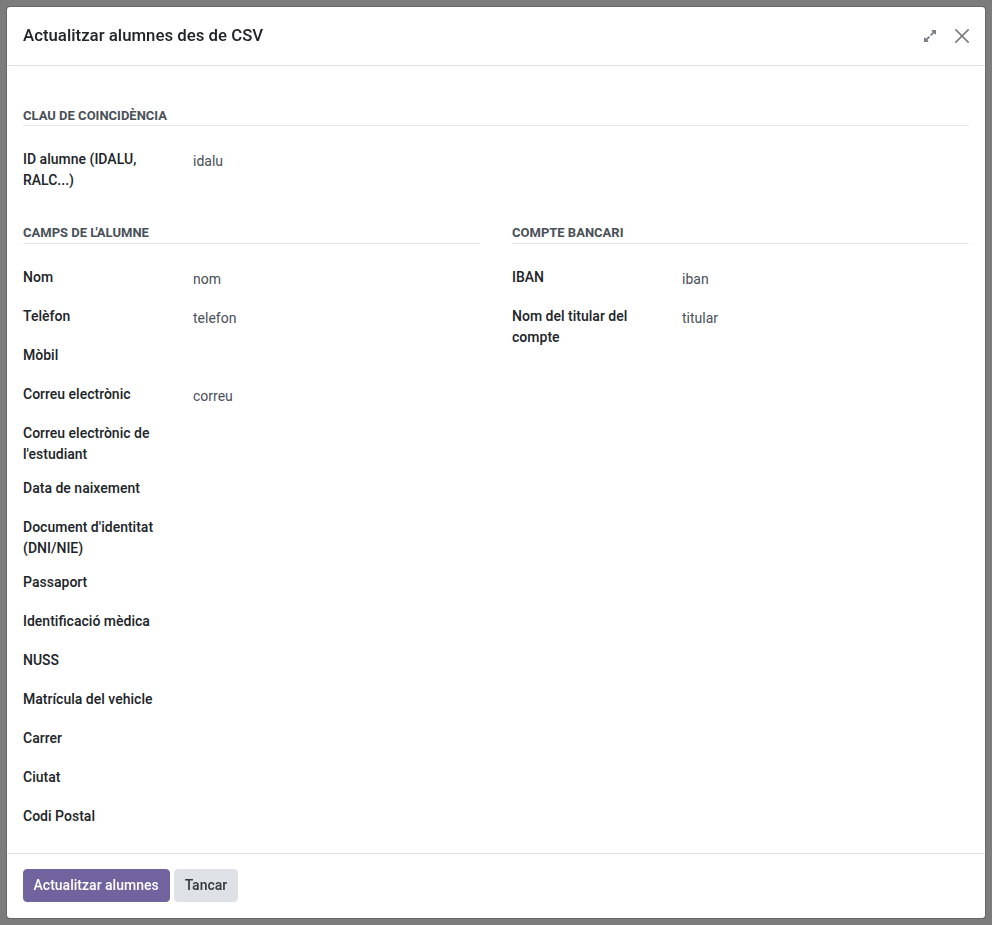
Once the columns are loaded, first choose which one holds the student ID (IDALU/RALC) — this is required, it’s how each row is matched to a student. Then map as many or as few of the other fields as your file actually has (name, phone, email, address, documents…) — anything left unmapped is simply not touched.
Updating the bank account
If you map an IBAN column and a row has a value in it, that becomes the student’s active bank account (any other account they had is deactivated). Leave IBAN unmapped, or leave the cell blank for a given row, and their bank details are left untouched.
Reading the result
After clicking Update students, you’ll see how many students were updated and how many IDs weren’t found, plus any row-level errors (e.g. an unparseable date). A downloadable result CSV — your original file with an extra status column — shows exactly what happened to every row, useful for a large file.
If the email column holds an address of the centre’s own domain (a corporate account), that value is not written: the student keeps their current personal email, the rest of the row is still updated, and the result lists a warning for that student.